Nested stars
Shape one outlined circle into a star, then repeat it smaller and turned.
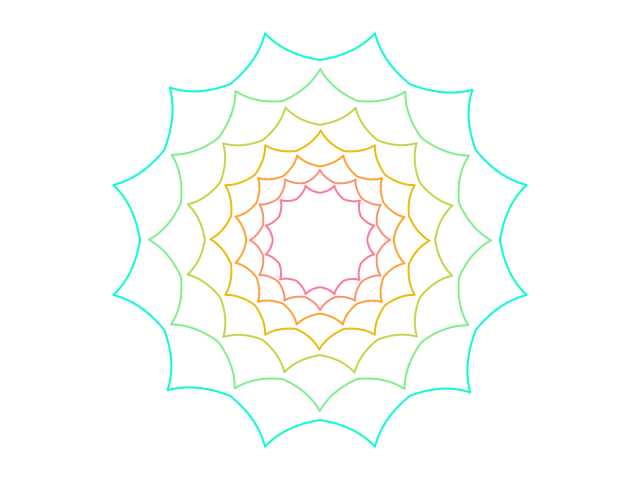
Beginner · Ellipse → Spikes → Clone → Color
Download scene JSON · Open SVG preview
Try it in the editor
Section titled “Try it in the editor”Download the JSON file and open it in svertik with Open or by dragging it onto the editor. The scene is complete and editable.
Build it step by step
Section titled “Build it step by step”- Create an outlined Ellipse, 360 × 360 px, with no fill, a turquoise stroke and Stroke width 2.
- Add Spikes: Count 12, Height 34, Curve 0.4. A positive Curve hollows the sides of each spike.
- Add Clone after Spikes in Linear mode: Count 7, Offset [0, 0], Scale step 0.8, Rotate step 15. With no offset the copies stay centered and each one is smaller and turned.
- Add Color in Gradient mode, from turquoise to pink, targeting Stroke.
- Move Spikes below Clone: the spikes are then added to every copy after it has been scaled, so their Height stays the same on every ring.
Render it from the terminal
Section titled “Render it from the terminal”Run this from the main svertik checkout, replacing the input path with the downloaded file:
pnpm svertik render nested-stars.json -o nested-stars.svgComplete scene
Section titled “Complete scene”{ "version": 1, "notes": "Concentric stars. Spikes shapes the source; Clone repeats it smaller and turned; Color grades the copies.", "document": { "width": 640, "height": 480 }, "objects": [ { "kind": "shape", "id": "star", "name": "Star", "shape": "ellipse", "params": { "width": 360, "height": 360, "fill": false, "stroke": true, "strokeColor": "#09fdd1", "strokeWidth": 2 }, "stack": [ { "id": "star-spikes", "type": "spikes", "params": { "count": 12, "height": 34, "curve": 0.4 } }, { "id": "star-clone", "type": "clone", "params": { "mode": "linear", "count": 7, "offset": [ 0, 0 ], "scaleStep": 0.8, "rotateStep": 15 } }, { "id": "star-color", "type": "color", "params": { "mode": "gradient", "from": "#09fdd1", "to": "#fe7b96", "target": "stroke" } } ] } ]}