Spotlight grid
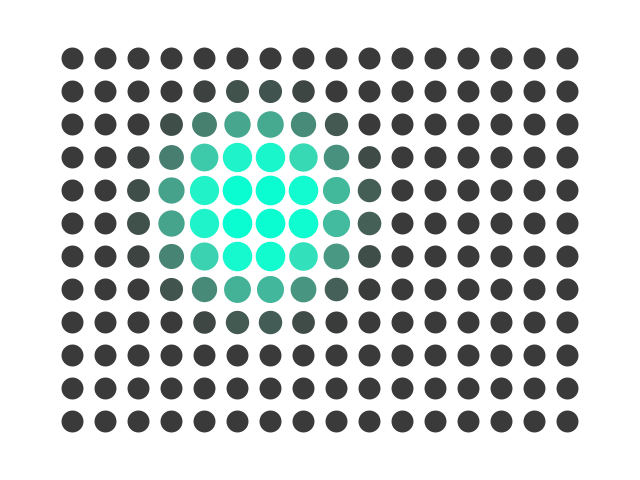
Light part of a dot grid with a circular Field that repaints and enlarges the dots inside it.
Intermediate · Ellipse → Clone → Field → Paint + Transform
Download scene JSON · Open SVG preview
Try it in the editor
Section titled “Try it in the editor”Download the JSON file and open it in svertik with Open or by dragging it onto the editor. The scene is complete and editable.
Build it step by step
Section titled “Build it step by step”- Create a filled dark grey Ellipse, 22 × 22 px, with no stroke.
- Add Clone in Grid mode: Columns 16, Rows 12, Spacing [1.5, 1.5].
- Add Field after Clone: Shape Circle, Center [0.38, 0.42], Width 0.55, Height 0.55, Softness 0.7.
- Nest Paint inside Field with a turquoise Fill color. Only the dots inside the field are repainted, and Softness fades them at the edge.
- Nest Transform inside Field too, with Scale 1.35. The dots grow in the same falloff.
- Move the Field’s Center to sweep the light across the grid.
Render it from the terminal
Section titled “Render it from the terminal”Run this from the main svertik checkout, replacing the input path with the downloaded file:
pnpm svertik render spotlight-grid.json -o spotlight-grid.svgComplete scene
Section titled “Complete scene”{ "version": 1, "notes": "A grid of grey dots lit by a circular Field. Only the dots inside the field are repainted.", "document": { "width": 640, "height": 480 }, "objects": [ { "kind": "shape", "id": "dots", "name": "Dots", "shape": "ellipse", "params": { "width": 22, "height": 22, "fill": true, "fillColor": "#3a3a3a", "stroke": false }, "stack": [ { "id": "dots-clone", "type": "clone", "params": { "mode": "grid", "columns": 16, "rows": 12, "spacing": [ 1.5, 1.5 ] } }, { "id": "dots-field", "type": "field", "params": { "shape": "circle", "center": [ 0.38, 0.42 ], "width": 0.55, "height": 0.55, "softness": 0.7 }, "children": [ { "id": "dots-paint", "type": "paint", "params": { "fill": true, "fillColor": "#09fdd1" } }, { "id": "dots-transform", "type": "transform", "params": { "scale": 1.35 } } ] } ] } ]}